UAE Visa Status Check by Passport Number : If you have applied for a UAE visa and want to know whether it has been approved, issued, or is still under process, this guide explains how to check your UAE visa status using your passport number in a clear and practical way.
This article covers:
- Who can check UAE visa status
- What information you need
- How the checking process works
- What different status messages mean
- Common problems and how to handle them
- Important clarifications about visit and residence visas
The information below is based on publicly available government processes and general visa procedures. Always rely on official UAE government portals or your sponsor/agent for final confirmation.
Who Can Check UAE Visa Status?
You may be able to check your visa status online if you fall into one of the following categories:
- Tourist visa applicants
- Visit visa applicants
- Employment visa applicants
- Residence visa applicants
- Dependents sponsored by family members
- Applicants who applied through a travel agency, airline, or sponsor
In most cases, visa status can be checked using:
- Passport number
- Nationality
- Date of birth (sometimes required)
- Application or reference number (if available)
The exact method depends on how and where your visa was applied.
Before You Check: What You Need Ready?
To avoid errors during the status check process, keep the following details ready:
- Passport number (exactly as printed, including letters and numbers)
- Nationality as per passport
- Date of birth
- Application reference number (if provided)
- Correct passport expiry details
Important:
- Enter your passport number exactly as shown.
- Do not add extra spaces.
- Make sure you are selecting the correct nationality.
Many “no record found” issues happen due to small typing mistakes.
How to Check UAE Visa Status by Passport Number?
Visa status is typically checked through official UAE government immigration portals. Depending on the type of visa and emirate, this may include:
- Federal immigration authorities
- Emirate-specific immigration departments
- Residency and foreign affairs departments
Official Authorities for UAE Visa Status Check
Visa status can only be checked through official UAE government immigration portals. The correct portal depends on which emirate issued the visa.
Federal Authority (All Emirates Except Dubai)
Official Authority:
Federal Authority for Identity, Citizenship, Customs and Port Security (ICP)
Official Website:
https://icp.gov.ae
Used For Visas Issued In:
- Abu Dhabi
- Sharjah
- Ajman
- Umm Al Quwain
- Ras Al Khaimah
- Fujairah
On the ICP website, look for services such as:
- File Validity
- Visa Inquiry
- Entry Permit Status
Dubai-Specific Authority
Official Authority:
General Directorate of Residency and Foreigners Affairs – Dubai (GDRFA Dubai)
Official Website:
https://gdrfad.gov.ae
Used For Visas Issued In:
- Dubai
On the GDRFA Dubai website, look for:
- Visa Status Inquiry
- Entry Permit Inquiry
- Residence Validity
General Process Overview
Although the interface may vary slightly between portals, the process generally works as follows:
- Visit the official immigration website (ICP or GDRFA Dubai).
- Navigate to the Visa Status, Entry Permit, or File Validity section.
- Select the appropriate visa type (Entry Permit, Residence Visa, Visit Visa).
- Enter your passport number exactly as printed.
- Select your nationality.
- Enter date of birth or additional required details (if prompted).
- Complete captcha verification.
- Submit the form to view your visa status.
Important: Always use the correct portal based on where the visa was issued.
If your visa was applied through:
- A travel agency → contact the agency if status does not appear.
- An employer → check with HR or your sponsor.
- An airline → use the airline’s tracking reference if provided.
Understanding UAE Visa Status Results
When you check your visa status, you may see one of the following messages:
1. Under Process
Your application is still being reviewed by immigration authorities.
Processing times vary depending on visa type and volume of applications.
2. Approved
The visa has been approved but may not yet be issued or stamped.
3. Issued
Your visa has been issued. You may be able to download or print a copy.
4. Entry Permit Issued
This means you are allowed to enter the UAE within the validity period mentioned on the permit.
5. Expired
The visa validity period has ended. Entry may no longer be permitted unless extended.
6. Rejected
The visa application was not approved. You may need to contact your sponsor or reapply.
7. No Record Found
This may happen due to:
- Incorrect passport number
- Wrong nationality selected
- Application not yet entered into the system
- Delay in system update
If this message continues after several days, contact your sponsor or the authority through which the visa was applied.
Visit Visa vs Residence Visa Status – What’s the Difference?
Many applicants are unsure whether they are checking the correct visa type.
Visit / Tourist Visa
- Short-term stay
- Usually 30, 60, or 90 days
- Cannot be used for employment
- Shows entry validity and stay duration
Residence Visa
- Issued after employment or family sponsorship
- Linked to Emirates ID process
- Requires medical test and biometric registration
- Longer validity period
When checking status, make sure you are selecting the correct category. Checking under the wrong category may show “no record found.”
Entry Validity vs Stay Duration
This is one of the most misunderstood areas.
Entry Validity
The period during which you must enter the UAE after visa issuance.
Stay Duration
The number of days you are allowed to remain in the UAE after entry.
These are not the same. Always review both carefully once your visa is issued.
Typical Processing Timelines (General Guidance)
Processing time depends on visa type and application channel. Timelines can change based on volume, security checks, and public holidays.
Approximate general timelines:
- Tourist / Visit Visa: Usually a few working days
- Employment Entry Permit: Several working days
- Residence Visa (after entry): Depends on medical test, biometrics, and documentation
Public holidays and weekends in the UAE may delay updates.
Always confirm timelines with your sponsor or official authority.
Common Problems When Checking Visa Status
1. Passport Number Not Recognized
- Recheck spelling and formatting
- Confirm you selected correct nationality
2. Status Not Updating
- System updates may take time
- Weekends or public holidays can delay updates
3. Passport Recently Renewed
If you renewed your passport after applying:
- The visa may still be linked to the old passport number
- Contact your sponsor for clarification
4. Name Mismatch
Small spelling differences between passport and application may cause issues.
5. Applied Through Agent
Sometimes tracking is managed internally by the agency. Contact them for updates.
Safety Tips: Avoid Fake Visa Status Websites
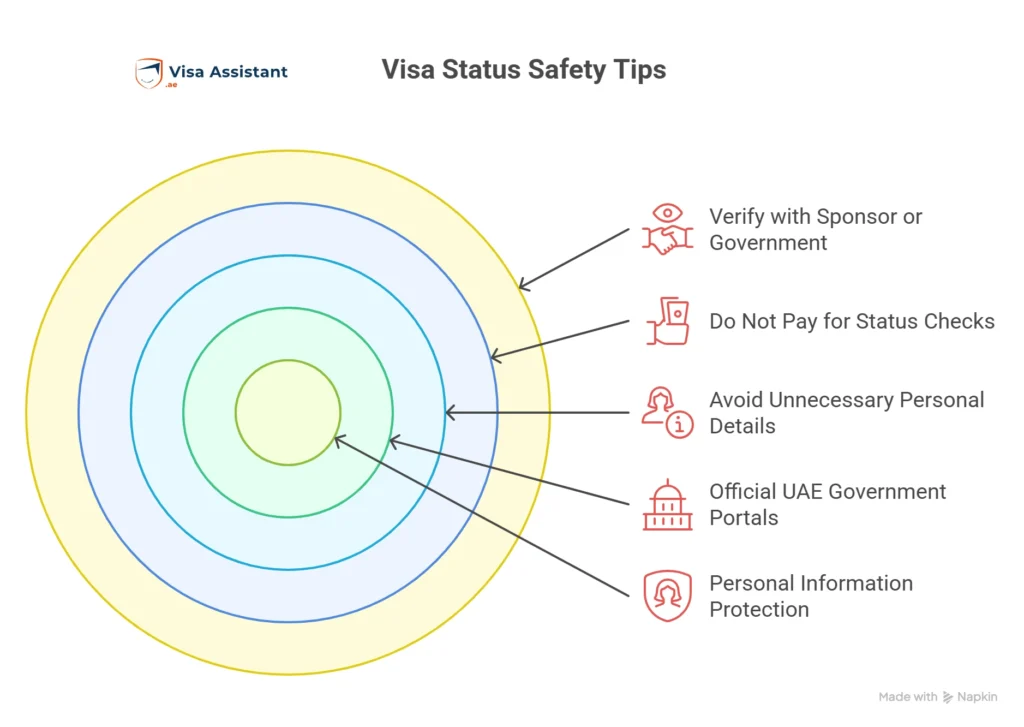
To protect your personal information:
- Only use official UAE government portals
- Avoid websites asking for unnecessary personal details
- Do not pay to “check” visa status
- Do not share passport scans on unverified websites
If unsure, verify through your sponsor or official government contact channels.
When to Contact Your Sponsor or Authority
You should contact your sponsor, employer, or travel agency if:
- Status shows rejected and no explanation is provided
- Status does not update for an extended period
- Passport details were changed after application
- You cannot find your record despite correct details
Do not rely solely on third-party sources for final confirmation.
Frequently Asked Questions
Can I check UAE visa status using passport number only?
In many cases, yes. However, some systems may also require nationality or date of birth.
Can I check Dubai visa status separately?
Visa tracking depends on the immigration authority that processed your application. Some emirates may have separate systems.
Why does my visa show “no record found”?
Common reasons include typing errors, wrong category selection, or system update delays.
How long does UAE visa approval take?
Processing time varies by visa type and application channel. Confirm with your sponsor or official source.
Can I check visa status without application number?
Often yes, if passport details are sufficient. Some portals may still request a reference number.
Final Advice
Checking UAE visa status by passport number is usually straightforward when you:
- Enter correct passport details
- Select the correct visa type
- Use official government portals
- Confirm information with your sponsor if needed
Always verify final visa validity, entry deadline, and stay duration before traveling.
For the most accurate and up-to-date information, rely on official UAE immigration authorities or your approved sponsor.